
What Is New
The current Android build of the Luminar photo editor carries the Luminar Mobile 3.6 changes: Auto Transform inside Crop fixes tilted perspective in one tap, Batch Export sends a set of finished photos out together as JPEG, PNG, TIFF or HEIF files, and Drag and Drop Export moves a photo straight into another app or folder. Batch Revert restores a whole set of edited photos in one tap, the toolbar gained tooltips and info buttons, and support for Chromebooks, desktop mode and foldable screens was tightened up alongside stability and performance work.
What Is Luminar Neo?
Luminar Neo is Skylum's AI photo editor, and on Android it arrives as the Luminar app: a photo editor built for Android phones, tablets and ChromeOS that carries the Neo family's AI tools, including EnhanceAI, SkyAI and RelightAI, into a touch-first editor.
One point deserves plain words, because the name causes real confusion. Luminar Neo itself is desktop software for Windows and macOS. There is no separate desktop build hiding inside an Android file. What Android users get is Skylum's Luminar app for mobile, launched for Android and ChromeOS in 2025, which shares the Neo AI approach and connects with Neo projects, so a photographer can start an edit on a phone and continue it in the desktop studio. When this site says Luminar Neo APK, it means that Android app by Skylum, package com.skylum.luminar.
The editor is built around a simple idea: most photos need light, colour and clarity fixed first, and AI should do that heavy lifting in one or two controls instead of twenty sliders. Under that sits a full professional bench: RAW editing, curves, detail tools, crop and geometry, landscape tools, monochrome and vintage looks, object removal, filters and presets.
Why People Download It
Three reasons come up again and again in reader mail. First, speed: EnhanceAI reads a photo and balances colour, tone and clarity from a single dial, so a flat phone photo becomes a keeper in seconds. Second, rescue: SkyAI replaces a washed out sky, RelightAI rebalances light after the shot, and Erase removes the stranger, the bin or the power line that spoiled the frame. Third, portraits: SkinAI, FaceAI, BodyAI and BokehAI retouch people gently, smoothing skin and reshaping subtly while keeping real texture, which is where cheap beauty filters usually fail.
The app also won Google Play's Best Multi-device App award in 2025, and it shows in the details: the layout adapts to phones, foldables, tablets and Chromebook screens instead of stretching a phone interface across every display.
Main Features
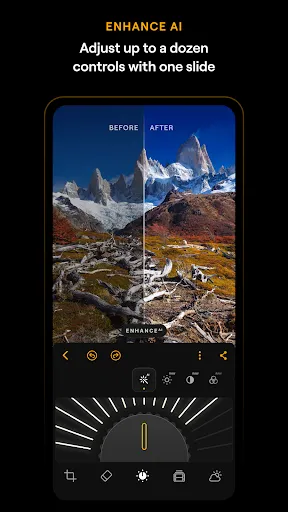
EnhanceAI. One dial improves colour, tone and clarity together. It is the fastest honest edit in the app and the right first move on almost any photo.
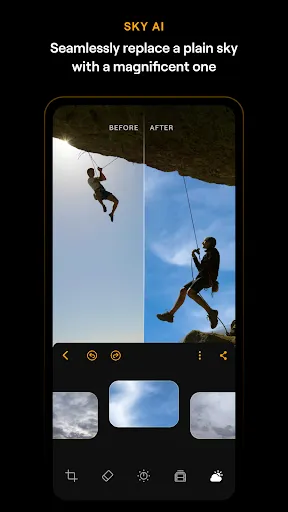
SkyAI. Realistic sky replacement that matches light and colour to the scene below it, turning a grey noon into a dramatic evening without a halo around rooftops and trees.
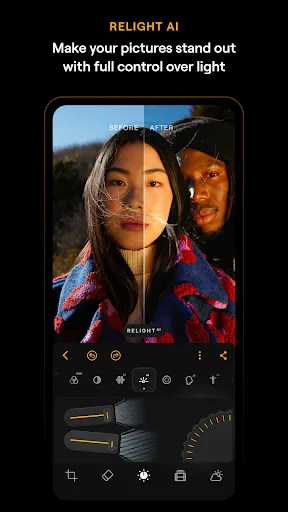
RelightAI. Rebalances lighting and exposure after the photo is taken, using depth so a face can be lifted without blowing out the background behind it.
StructureAI. Adds texture and detail where a photo needs bite, and leaves smooth areas like sky and skin alone, so sharpness never turns crunchy.
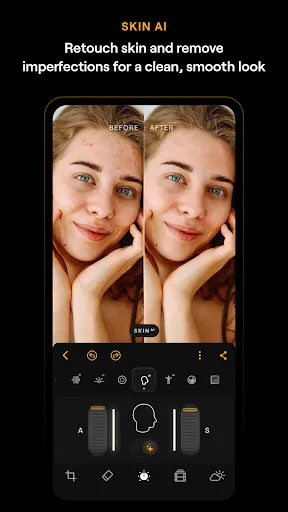
SkinAI and FaceAI. Skin smoothing that removes blemishes, shine and small wrinkles while keeping pores and character, plus face brightening and gentle proportion refinement.
BodyAI and BokehAI. Subtle reshaping for portraits, and background blur with adjustable focus and bokeh shapes for a lens look from a phone photo.
RAW editing and curves. A proper RAW workflow for maximum quality, with curves and colour tools for photographers who want manual control over tone and mood.
Erase and object removal. Brush over a distraction and the app rebuilds what sits behind it, which rescues street scenes, travel shots and product photos.
Crop, geometry and Auto Transform. Crop, resize, straighten and rotate, with one-tap perspective correction for buildings and interiors that lean.
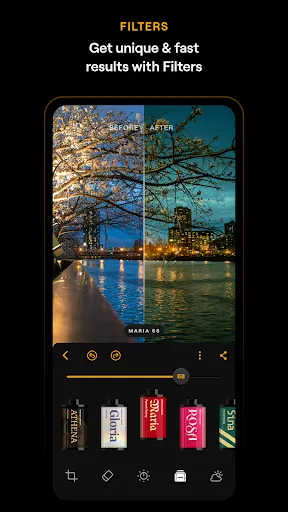
Filters, presets and batch export. Monochrome, vintage and glow looks as starting points, then export one photo or a whole batch as JPEG, PNG, TIFF or HEIF.
Screenshots
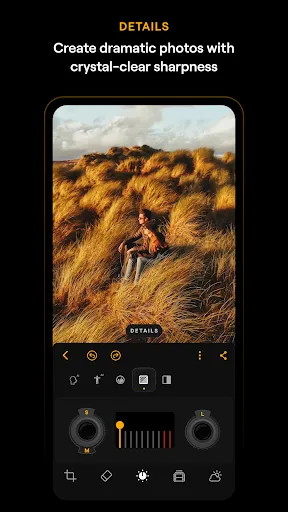
These screens come from the app's own store listing and show the real Android editor: the Enhance dial, SkyAI replacement, RelightAI on a portrait, SkinAI retouching, the filter roll and the Details tool. Swipe sideways to move through them.
Safety and Verification
Before any file is listed here, the checks on the review page run on real phones: the package name must read com.skylum.luminar, the developer must read Skylum Software, and the file must install cleanly and open to the Luminar editor. The app itself carries no ads, and its store listing is published by Skylum Software.
Readers can run the same checks in a minute. Compare the package name and developer in the APK details table with what the install screen shows. Run the phone security scan on the file before opening it. Read the permissions at install time: photo and storage access fits a photo editor, while contacts, call logs and messages do not. Any mismatch means stop and delete the file.
How to Download and Install
- Open the download page on this site and wait for the short countdown to finish.
- Use the download button when it appears and save the file to the phone.
- Open Settings, find the browser or file manager used for the download, and allow installs from that source for this one install.
- Open the saved file, read the permissions on the install screen, and confirm only if the package name and developer match the APK details table above.
- Open Luminar, grant photo access, and import a first photo to try EnhanceAI on.
- Go back to Settings and switch the install permission off again once the app is in place.
How to Update
Updating keeps every edit. Install the newer file over the existing app and Android replaces the old build in place, leaving the photo library, edits and presets untouched. If a subscription is active, it carries over on the same account. Before a big version jump, export a few favourite finished photos as full quality files, so a copy of the finished work always exists outside the app.
Device Compatibility
The app is optimised for Android 11 and newer, and for ChromeOS devices with Android Runtime support. It runs on phones, tablets and foldable devices, and the interface adjusts to screen size and shape, so a foldable opened flat or a Chromebook in desktop mode gets a layout built for that screen rather than a stretched phone view. Older devices may meet feature limits on the heaviest AI tools, and RAW files from large sensors ask more of the processor than phone JPEGs do.
Technical Details
The Android package is com.skylum.luminar, published by Skylum Software. The app targets recent Android releases, handles RAW, JPEG, PNG, TIFF and HEIF workflows, exports in JPEG, PNG, TIFF and HEIF, and offers subscription plans (monthly, annual with a free trial period, and a lifetime licence) that unlock the full tool set. Edits made on mobile integrate with Luminar Neo on Windows and macOS, so the same project can move between phone and desktop.
Why This App Is Useful
Travel photos with dead skies. SkyAI plus the landscape tools (dehaze, foliage and golden hour boosts) turn a flat holiday frame into the photo the trip felt like.
Portraits in bad light. RelightAI lifts a face, SkinAI tidies skin, and BokehAI softens a messy background, which covers most family and event photos.
Camera RAW files on the road. A photographer can develop RAW files on a tablet in the evening instead of waiting for the laptop at home.
Listings and small business photos. Erase clears clutter, Auto Transform straightens rooms, and batch export sends a matching set of images out in one go.
Pros and Cons
What works well: genuinely fast AI edits that stay natural; a full RAW and curves bench under the simple surface; portrait tools that keep skin texture; layouts that adapt to tablets, foldables and Chromebooks; batch export in four formats.
What to know: the full tool set sits behind a subscription or lifetime licence; heavy AI work on large RAW files can feel slow on older phones; and anyone expecting the exact desktop Luminar Neo interface should read the What Is section above, because the Android app is its own editor that connects to Neo rather than a copy of it.
Old Versions
Earlier Android builds included the 3.1 line (with a crash fix in 3.1.1), the 3.0 line and the 2.1 line, each adding tools on the way to the current build. Only the current build is listed on the download page, because older builds miss the Auto Transform, batch export and stability work, and mixing builds across devices that share projects causes avoidable confusion.
Alternatives to Consider
The editor built into your phone gallery covers crops, basic light fixes and a few filters, and costs nothing, but it has no sky replacement, no RAW bench and no portrait AI. A desktop editor gives the deepest control and the biggest screen, at the price of sitting down at a desk for every photo. Luminar Neo on desktop is the closest relative of this app and the natural step up for photographers who outgrow the phone. The Android app earns its place between those two: near desktop AI tools, in a pocket, in under a minute per photo.
Troubleshooting
The app opens slowly on a big RAW file. RAW development is processor heavy. Close other apps, give the first render a few seconds, and edit a copy at reduced size for social sharing if the phone is older.
An AI tool looks too strong. Every AI control is a dial, not a switch. Pull it back to half, then judge the photo at arm's length instead of zoomed in.
Export looks different from the preview. Check the export format and quality settings. HEIF and JPEG compress differently, and a TIFF export keeps the most information for further desktop work.
The install is blocked. The install permission belongs to the app that opened the file, usually the browser or file manager. Allow it there, install, then switch it off again.